LaTeX works best when the source describes the structure and meaning of a document, while the document class controls its appearance. A good manuscript is therefore not the one with the most packages or the cleverest macros. It is the one that compiles reliably, reads naturally in source form, and can be restyled without rewriting its content.
This tutorial develops that workflow from a small article template. It then shows how to organize the source, typeset mathematics, manage references, and present figures, tables, algorithms, and program code without turning the preamble into a second project.
If a journal, conference, university, or publisher supplies a class or author kit, begin with that kit rather than replacing only its
\documentclassline. Venue classes often control fonts, margins, captions, bibliographies, and floats, so add packages only after checking the instructions and a clean test compilation.
Begin with a small, reliable document
The following template is a practical starting point for a draft or technical note. It targets a current pdfLaTeX installation and deliberately includes only broadly useful packages. Packages for citations, algorithms, code, or specialized notation are added later when the document actually needs them.
LaTeX source
\documentclass[11pt]{article}

% Language and fonts (pdfLaTeX)
\usepackage[T1]{fontenc}
\usepackage{lmodern}
\usepackage[english]{babel}

% Page and text typography
\usepackage[margin=1in]{geometry}
\usepackage{microtype}

% Mathematics
\usepackage{amsmath,amssymb,amsthm}
\usepackage{mathtools}
\usepackage{bm}

% Figures and tables
\usepackage{graphicx}
\usepackage{booktabs}

% Cross-references: load late, in this order
\usepackage[hidelinks]{hyperref}
\usepackage[nameinlink,noabbrev]{cleveref}

% Number theorem-like environments together within each section
\theoremstyle{plain}
\newtheorem{theorem}{Theorem}[section]
\newtheorem{lemma}[theorem]{Lemma}
\newtheorem{proposition}[theorem]{Proposition}
\newtheorem{corollary}[theorem]{Corollary}

\theoremstyle{definition}
\newtheorem{definition}[theorem]{Definition}
\newtheorem{assumption}[theorem]{Assumption}

\theoremstyle{remark}
\newtheorem{remark}[theorem]{Remark}

\title{A Clear and Informative Title}
\author{First Author \and Second Author}
\date{}

\begin{document}

\maketitle

\begin{abstract}
  State the question, the approach, the principal result, and why it matters.
\end{abstract}

\section{Introduction}
\label{sec:introduction}

Introduce the problem and give the reader a concise map of the document.

\section{Main result}
\label{sec:main-result}

For every real number $x$,
\begin{equation}
  \label{eq:square-nonnegative}
  x^2 \geq 0.
\end{equation}

\begin{theorem}
  \label{thm:sum-of-squares}
  For all $a,b \in \mathbb{R}$, we have $a^2+b^2 \geq 0$.
\end{theorem}

\begin{proof}
  By \cref{eq:square-nonnegative}, both terms are nonnegative;
  therefore, their sum is nonnegative.
\end{proof}

\end{document}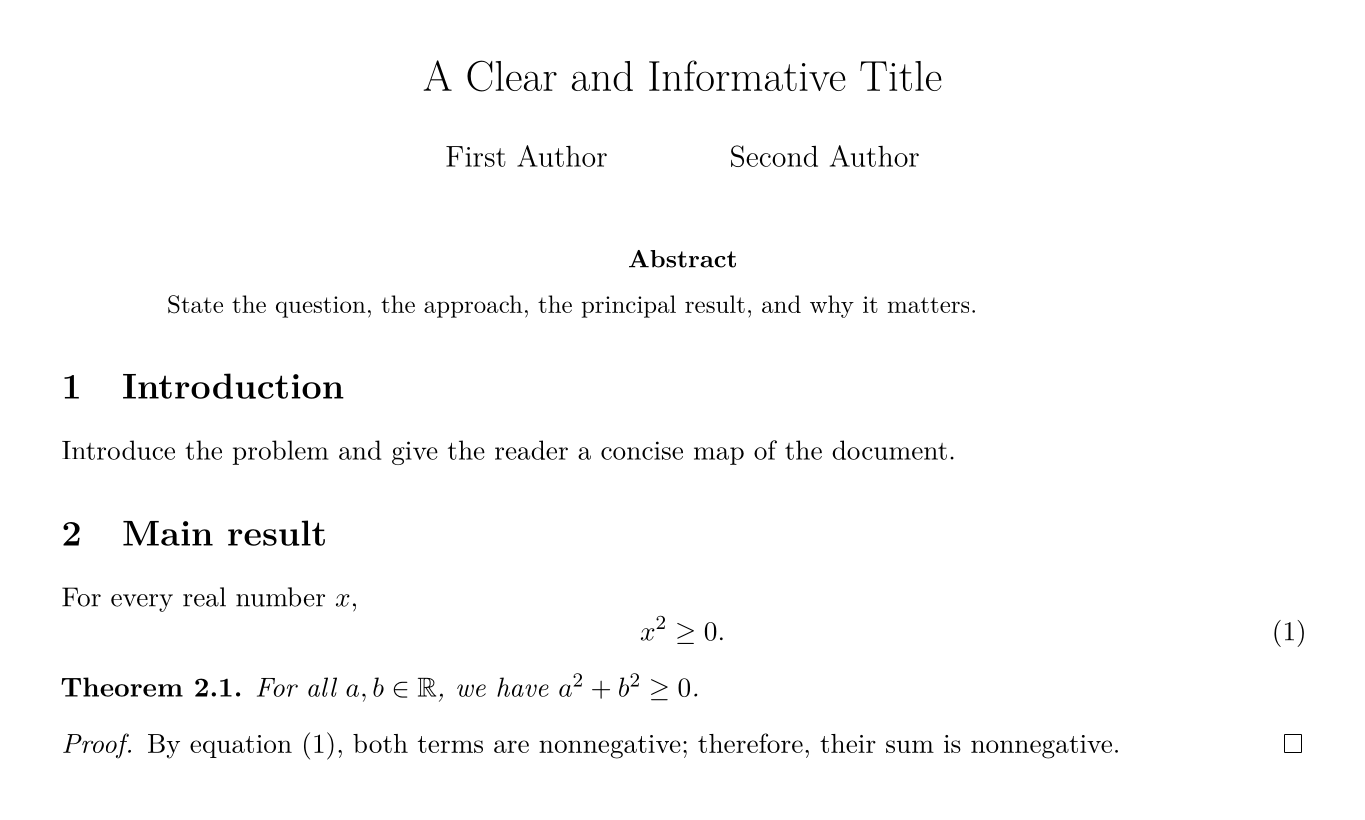
The order of the preamble is intentional.
Language and font setup comes first, followed by typography, mathematics, and content-specific packages.
Bibliography support, when used, should come before hyperref; hyperref should be loaded late; and cleveref should normally follow hyperref and any package that defines objects it must reference.
Some classes and packages impose exceptions, so their documentation takes precedence over a generic rule.
Modern LaTeX treats UTF-8 as the default input encoding, so a current pdfLaTeX document normally does not need \usepackage[utf8]{inputenc}.
The fontenc and lmodern lines above are specific to pdfLaTeX.
For system fonts, extensive Unicode, or multilingual typesetting, LuaLaTeX or XeLaTeX is often more convenient; use fontspec there instead of inputenc, fontenc, and lmodern.
Choose the engine early and keep it consistent across local builds and automated builds.
The draft uses geometry to provide comfortable margins and hidelinks to keep links unobtrusive in print.
A publisher class may already make both decisions.
Likewise, colored links can be helpful on screen, but their colors should remain legible in both color and grayscale and should never be the only indication that text is linked.
Write source that remains readable
A collaborator should be able to understand the structure of a manuscript before compiling it.
The most effective source style is simple: use spaces rather than tabs, indent nested material consistently, and let blank lines mean paragraphs.
Do not use \\, repeated spaces, or arbitrary \hspace and \vspace commands to arrange ordinary prose.
Those commands describe visual adjustments rather than document structure and tend to fail when the class, font, or page size changes.
In prose, a useful convention is to begin each sentence on a new source line. TeX treats that line break as an ordinary space, while version-control diffs remain focused on the sentence that changed. A soft line limit of roughly 80–100 characters is helpful, but a formula or command should be broken at a meaningful boundary rather than at an arbitrary column.
LaTeX source
\section{Method}
\label{sec:method}

We first define the quantity used in the analysis.
The definition also fixes the notation used in the remainder of the paper.

\begin{definition}
  \label{def:energy}
  For a state $x$, define its energy by
  \begin{equation}
    \label{eq:energy}
    E(x) = \frac{1}{2}\lVert x\rVert_2^2.
  \end{equation}
\end{definition}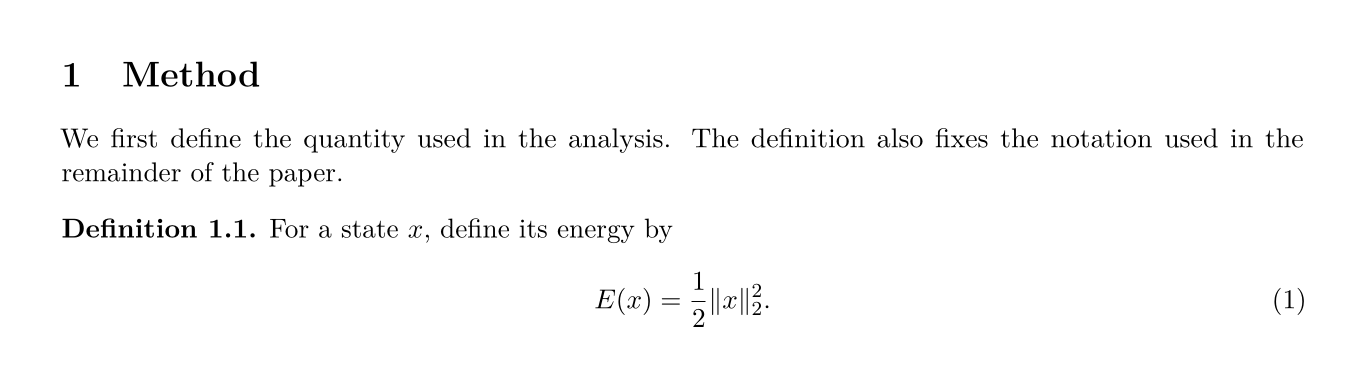
This style also keeps environments visually balanced: \begin and \end occupy their own lines, the contents are indented by two spaces, and labels sit close to the objects they name.
Multiline package options deserve the same treatment.
\usepackage[
  backend=biber,
  style=authoryear,
  giveninits=true
]{biblatex}
Comments should explain intent, assumptions, or a necessary workaround rather than restating the next command.
Prefer a short full-line comment.
An end-of-line % suppresses the following space, which is essential in a few macro definitions but surprising in ordinary prose, so use it deliberately.
Delete obsolete commented-out passages once they are no longer useful; version control already preserves them.
Split files along meaningful boundaries
A short note is easiest to maintain as one file.
As a document grows, keep main.tex as a readable map of the manuscript and split only along stable boundaries.
A typical project might look like this:
main.tex
macros.tex
references.bib
figures/
sections/
  introduction.tex
  method.tex
  results.tex
The main file can then contain \input{macros} in the preamble and commands such as \input{sections/method} in document order.
The .tex extension may be omitted.
Avoid creating a separate file for every paragraph or a macro for every symbol: indirection is useful only when it makes the document easier to change or understand.
Let macros express meaning
A macro earns its place when it gives a recurring concept one spelling, hides a genuinely awkward construction, or allows a notation choice to change in one place.
Use \newcommand for simple commands, \DeclareMathOperator for named operators, and the mathtools paired-delimiter tools for delimiters.
These interfaces check more errors than low-level \def and make the intended role visible.
Here is a compact macros.tex suitable for many mathematical documents:
% Number systems and common objects
\newcommand{\Reals}{\mathbb{R}}
\newcommand{\Integers}{\mathbb{Z}}
\newcommand{\vect}[1]{\bm{#1}}
\newcommand{\mat}[1]{\bm{#1}}

% Named operators
\DeclareMathOperator*{\argmin}{arg\,min}
\DeclareMathOperator*{\argmax}{arg\,max}
\DeclareMathOperator{\Var}{Var}

% Probability and expectation
\newcommand{\Prob}{\mathbb{P}}
\newcommand{\E}{\mathbb{E}}

% Differential
\newcommand{\diff}{\mathop{}\!\mathrm{d}}

% Delimiters supplied by mathtools
\DeclarePairedDelimiter{\abs}{\lvert}{\rvert}
\DeclarePairedDelimiter{\norm}{\lVert}{\rVert}
\DeclarePairedDelimiter{\ceil}{\lceil}{\rceil}
\DeclarePairedDelimiter{\floor}{\lfloor}{\rfloor}
\DeclarePairedDelimiterX{\inner}[2]{\langle}{\rangle}{#1,\,#2}
The commands can then be combined without repeating their visual definitions:
LaTeX source
\[
  \vect{x} \in \Reals^n,
  \qquad
  \E[X \mid Y],
  \qquad
  \abs*{\frac{a}{b}},
  \qquad
  \inner{u}{v}.
\]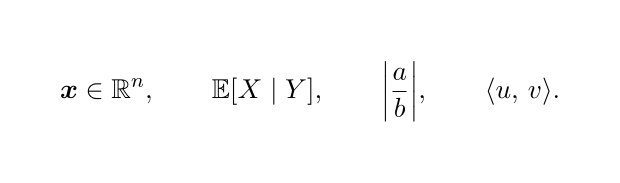
Write \abs{x} and \norm{x} for normal-sized delimiters, and use the starred forms such as \abs*{\frac{a}{b}} only when automatic sizing is useful.
Automatic \left and \right around every expression often produce delimiters that are larger than the surrounding typography requires.
The vector and matrix commands above encode a chosen convention, not a universal law. Many fields use bold italic for vectors and bold uppercase for matrices; others use arrows, upright bold, or no typographic distinction. Choose a convention that separates concepts the reader must distinguish, state it if it is not obvious, and apply it consistently. The same principle applies to upright symbols for the exponential base, imaginary unit, or differential: these are defensible style choices rather than universal LaTeX rules.
Do not redefine standard commands such as \le, \epsilon, or \section merely to save keystrokes.
Avoid aliases used only once, and do not hide sentences or large pieces of document structure inside macros.
Source that says what it means is more valuable than source that is merely short.
Typeset mathematics by structure
LaTeX provides different display environments because different formulas have different structures.
Use equation for one numbered statement, align for several relations aligned at a meaningful symbol, multline for one long expression that must wrap, and cases for piecewise definitions.
Use their starred forms when no number is needed.
The older eqnarray environment has inferior spacing and should not be used, and $$ ... $$ bypasses LaTeX's document-level display machinery.
When several aligned lines form one derivation and need one number, place aligned inside equation:
LaTeX source
\begin{equation}
  \label{eq:complete-square}
  \begin{aligned}
    x^2 + 2ax + a^2
      &= (x+a)^2, \\
    x^2 + 2ax
      &= (x+a)^2 - a^2.
  \end{aligned}
\end{equation}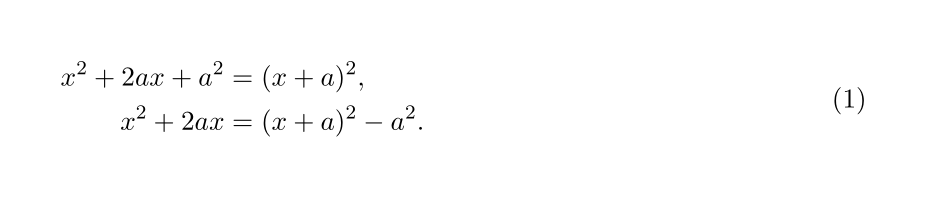
If each row makes a separately referenced claim, use align and label the rows individually:
LaTeX source
\begin{align}
  f(x)  &= ax^2 + bx + c, \label{eq:quadratic} \\
  f'(x) &= 2ax + b.       \label{eq:derivative}
\end{align}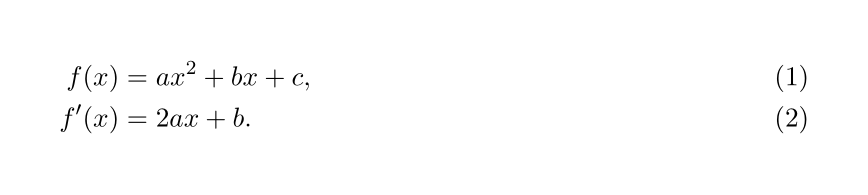
Alignment marks belong immediately before the relation being aligned.
Keep one logical step on each row, and use \notag for an unnumbered row when an otherwise numbered align is the clearest structure.
Do not insert a blank line inside a display environment: in TeX, a blank line begins a paragraph and is not valid in mathematics.
Displayed mathematics remains part of the surrounding sentence.
End it with a comma when the sentence continues, a period when the sentence ends, and no punctuation only when the grammar calls for none.
Use \text{...} for short words inside mathematics, as in x > 0 \text{ for all } x \in A, and define recurring names such as rank, Var, or argmin as operators rather than imitating them with italic letters.
TeX already knows the spacing of mathematical relations and operators when the right command is used.
Write \mid for a conditional bar, as in \E[X \mid Y], rather than a bare |.
Use \colon in a mapping such as f \colon A \to B, juxtaposition for ordinary multiplication, \cdot when juxtaposition would be ambiguous, and \times for a Cartesian product or cross product.
Choose either A^\top or another documented transpose convention and use it throughout.
Number only displays that the text will refer to. Excess numbers make important equations harder to find, while manual tags detach numbering from LaTeX's reference system.
Build references that survive revision
Labels should describe an object's role rather than its current number.
Names such as sec:method, fig:error-rate, tab:parameters, eq:energy-bound, and thm:existence remain meaningful after sections move; names such as eq:7 do not.
Place a section label immediately after the section command, a theorem label inside the theorem environment, an equation label inside the numbered display or row, and a figure or table label immediately after its caption.
Then let cleveref supply the object name and number:
LaTeX source
As shown in \cref{fig:error-rate}, the error decreases with sample size.
\Cref{thm:existence} gives the condition required by this argument.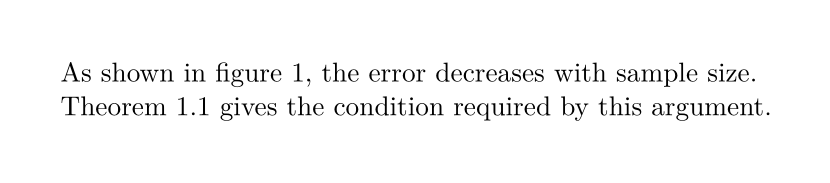
Use \Cref at the beginning of a sentence and \cref elsewhere.
If cleveref is unavailable, write a nonbreaking space between a manual name and reference, such as Figure~\ref{fig:error-rate}.
The prefix in a label is for the people reading the source; it does not tell cleveref what the object is.
The environment and its counter determine whether a reference is called an equation, theorem, figure, or table.
For a custom environment, define its reference names explicitly with \crefname and \Crefname rather than relying on a label such as model: or result:.
Manage citations without locking in a venue style
Bibliography requirements vary too much for one universal citation style.
For an independent draft, biblatex with Biber offers a clean modern workflow; a venue may instead require BibTeX, natbib, or its own bibliography commands.
Do not mix those systems in one document.
For an author–year draft, add the following before hyperref and cleveref, and create references.bib:
\usepackage{csquotes}
\usepackage[
  backend=biber,
  style=authoryear
]{biblatex}
\addbibresource{references.bib}
In the document, \textcite{key} makes the author part of the sentence, while \parencite{key} produces a parenthetical citation.
Place \printbibliography where the reference list should appear.
With a configured TeX installation, latexmk will run the required LaTeX and Biber passes and will resolve the citations.
A .bib record should contain accurate bibliographic facts rather than hand-formatted output.
Protect capitalization that the bibliography style must not change, especially acronyms and proper nouns:
@article{example2026,
  author  = {Example, Alice and Sample, Bo},
  title   = {An Analysis of {GPU}-Accelerated Methods},
  journal = {Journal of Reproducible Examples},
  year    = {2026},
  volume  = {12},
  number  = {3},
  pages   = {101--120},
  doi     = {10.1234/example.2026.001}
}
With that record in place, the citation commands and bibliography render from the same data:
LaTeX source
As \textcite{example2026} show, hardware acceleration can reduce runtime
without changing the numerical method.
The implementation details are documented with the results
\parencite{example2026}.

\printbibliography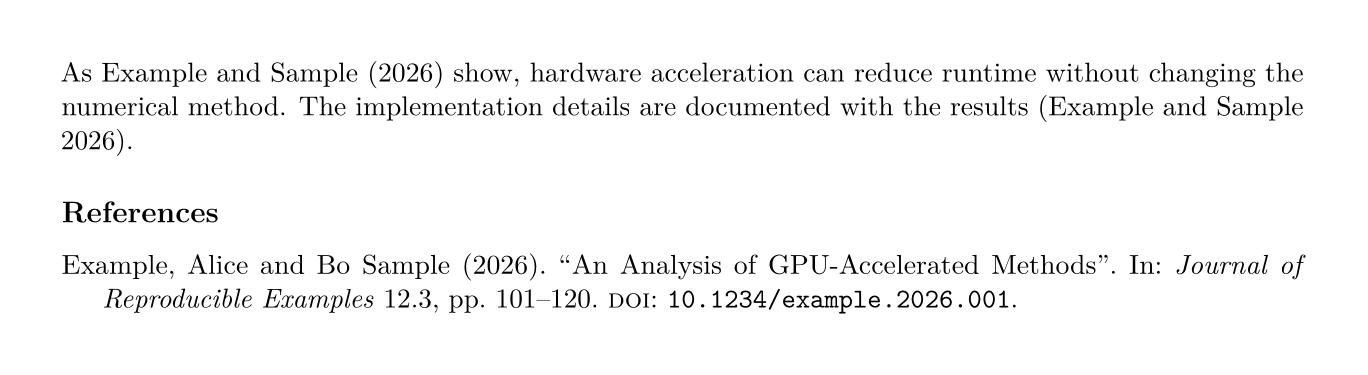
Keep stable identifiers such as a DOI when available, and avoid typing author names or years directly into prose when a citation command can supply them. That separation allows the same database to support author–year, numeric, or venue-specific output.
Present figures, tables, and program code
A figure or table should be understandable from its caption and surrounding discussion, not merely placed near the first empty space.
LaTeX floats them so that pages can remain balanced; placement options such as [tbp] express preferences rather than commands.
Before forcing a float with [H] or manual spacing, improve its size, placement in the source, or surrounding explanation.
Figures
For plots, diagrams, and line art, prefer a vector format such as PDF when the workflow supports it. Use PNG or JPEG for photographs and other genuinely raster material. Make labels legible at final size, include units, and distinguish series by markers or line styles as well as color.
LaTeX source
\begin{figure}[tbp]
  \centering
  \includegraphics[width=0.8\linewidth]{figures/error-rate.pdf}
  \caption{Error rate as a function of sample size.
    Markers show the observations; the line shows the fitted trend.}
  \label{fig:error-rate}
\end{figure}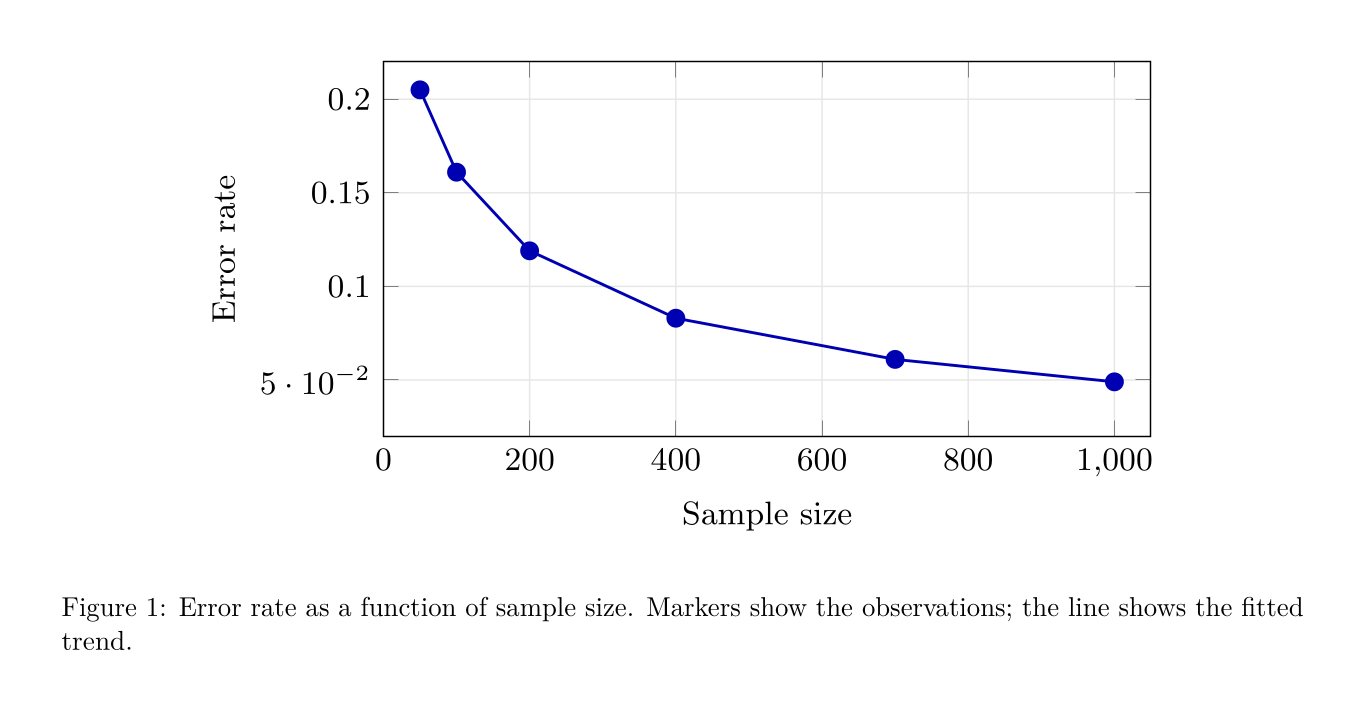
Use \linewidth for the available width, particularly inside a column, list, or subfigure.
Place the caption and label together, and follow any accessibility mechanism provided by the document class for alternative descriptions.
Tables
Tables benefit from restraint.
The booktabs package supplies well-spaced horizontal rules; vertical rules usually add clutter.
The siunitx package aligns numbers by decimal marker and formats quantities consistently.
LaTeX source
% Preamble
\usepackage{siunitx}

% Document
\begin{table}[tbp]
  \centering
  \caption{Runtime and accuracy for two methods.}
  \label{tab:comparison}
  \begin{tabular}{l S[table-format=2.1] S[table-format=1.2]}
    \toprule
    Method & {Time (s)} & {Accuracy} \\
    \midrule
    Baseline & 18.7 & 0.86 \\
    Proposed & 12.4 & 0.91 \\
    \bottomrule
  \end{tabular}
\end{table}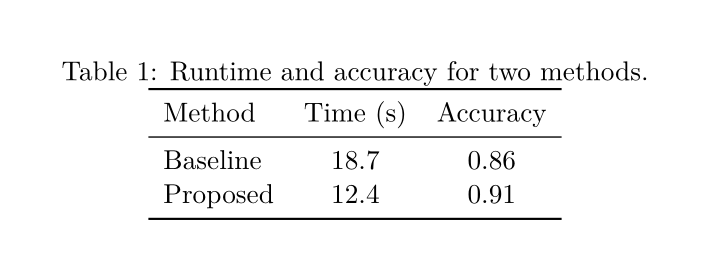
Report only meaningful precision and name the statistic being shown.
For empirical results, state the sample size and whether an interval or variation measure is a standard deviation, standard error, confidence interval, interquartile range, or something else.
If a table needs tiny type or \resizebox to fit, the better solution is usually to remove columns, shorten headings, split the table, or change its orientation.
Program source that remains readable
Program code should remain text: readers should be able to copy it, search it, and refer to its lines.
For a portable document, the listings package is a dependable baseline that does not require an external highlighter.
The following style uses a modest background, readable contrast, preserved indentation, and line wrapping for unusually long lines.
\usepackage{xcolor}
\usepackage{listings}

\definecolor{codebg}{HTML}{F6F8FA}
\definecolor{codeframe}{HTML}{D0D7DE}
\definecolor{codecomment}{HTML}{57606A}
\definecolor{codekeyword}{HTML}{0550AE}
\definecolor{codestring}{HTML}{0A3069}

\lstdefinestyle{readable}{
  basicstyle=\ttfamily\small,
  backgroundcolor=\color{codebg},
  frame=single,
  rulecolor=\color{codeframe},
  framesep=6pt,
  xleftmargin=0.5em,
  xrightmargin=0.5em,
  numbers=left,
  numberstyle=\scriptsize\color{codecomment},
  numbersep=8pt,
  breaklines=true,
  columns=fullflexible,
  keepspaces=true,
  showstringspaces=false,
  tabsize=2,
  keywordstyle=\color{codekeyword}\bfseries,
  commentstyle=\color{codecomment}\itshape,
  stringstyle=\color{codestring},
  captionpos=b
}

\lstset{style=readable}
Load xcolor and listings before hyperref and cleveref.
Use \lstinline|variable_name| for a short inline fragment and lstlisting for a self-contained example.
LaTeX source
\begin{lstlisting}[
  language=Python,
  caption={Newton iteration used in the experiment.},
  label={lst:newton}
]
def newton(f, derivative, x, tolerance=1e-8):
    while abs(f(x)) > tolerance:
        x -= f(x) / derivative(x)
    return x
\end{lstlisting}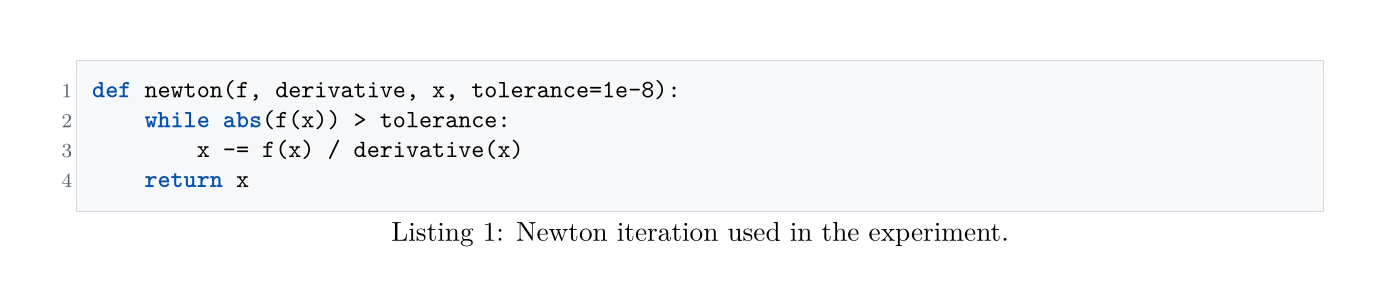
For code that also exists in the project, replace the copied body with \lstinputlisting[language=Python]{code/newton.py} so the manuscript cannot silently drift away from the real file.
Line numbers help when the prose refers to a longer listing; disable them with numbers=none for a two- or three-line example.
Keep indentation meaningful, avoid screenshots of code, and make sure comments and keywords remain distinguishable when printed in grayscale.
The minted package offers richer highlighting through Pygments, but it adds an external build dependency and may require shell-escape support that a publisher or automated service does not allow.
Use it only when that workflow is controlled and documented.
Structure formal statements and algorithms
The theorem declarations in the opening template share a counter, producing a coherent sequence such as Theorem 2.1, Lemma 2.2, and Definition 2.3.
The plain style uses an italic body for results; definition and remark use upright text for definitions, assumptions, examples, and commentary.
This is a conventional default, not a reason to override a venue's theorem setup.
Use the proof environment rather than typing a heading and end mark by hand.
When a proof ends in displayed mathematics, \qedhere can place the end mark correctly:
LaTeX source
\begin{proof}
  The estimate follows from the triangle inequality:
  \begin{equation*}
    \norm{x+y} \leq \norm{x} + \norm{y}. \qedhere
  \end{equation*}
\end{proof}
If an argument follows from a standard theorem, cite it, verify its hypotheses in the present setting, and include the application-specific steps. Calling a result standard is not a substitute for a complete argument.
For pseudocode, choose one package family and use its syntax consistently.
The combination of algorithm and algpseudocode is widely available; algorithm2e is a separate alternative, not an add-on to the same example.
LaTeX source
% Preamble, before hyperref and cleveref
\usepackage{algorithm}
\usepackage{algpseudocode}

% Document
\begin{algorithm}[tbp]
  \caption{Fixed-point iteration}
  \label{alg:fixed-point}
  \begin{algorithmic}[1]
    \State Choose an initial value $x_0$
    \For{$k = 0,\dots,K-1$}
      \State $x_{k+1} \gets g(x_k)$
      \If{$\norm{x_{k+1}-x_k} < \varepsilon$}
        \State \Return $x_{k+1}$
      \EndIf
    \EndFor
    \State \Return failure to converge within $K$ iterations
  \end{algorithmic}
\end{algorithm}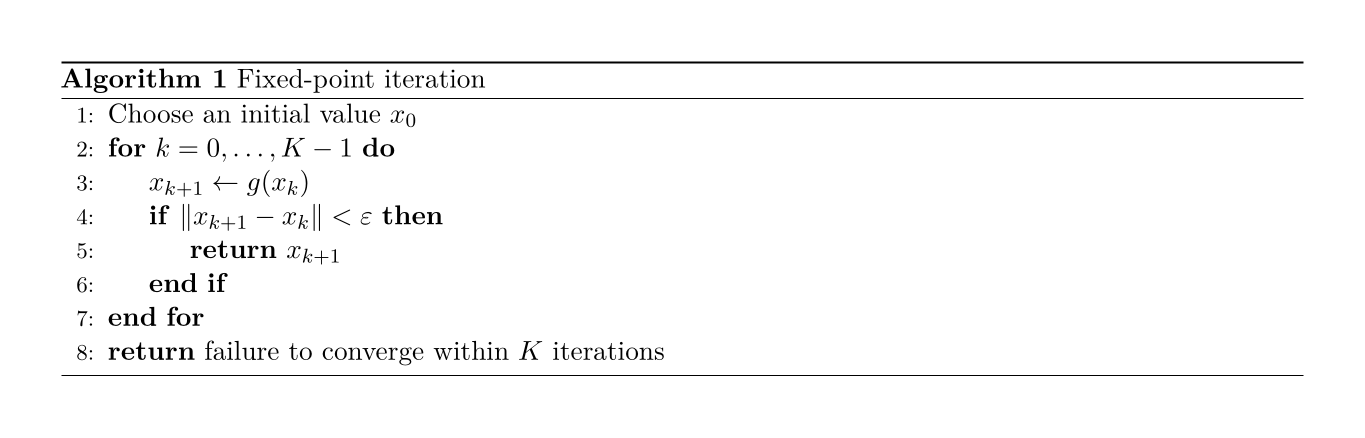
A useful algorithm states its inputs, outputs, stopping rule, and failure behavior. Line numbers help discussion, but the surrounding prose should explain why the procedure works rather than translating each line into a sentence.
Prepare the final document
The last stage is not a hunt for cosmetic adjustments. It is a controlled pass through the evidence, the prose, the build log, and the rendered pages.
Describe computational work reproducibly
Good typesetting cannot rescue an underspecified experiment. For computational or data-based work, identify the data source and preprocessing, software and package versions, parameter settings, random seeds, evaluation protocol, and number of repetitions. Report hardware only when it affects the claim, such as runtime, memory use, or numerical reproducibility. Name every summary and uncertainty measure, describe how it was aggregated, and avoid decimal precision that the measurement process cannot support.
Keep generated plots and tables reproducible from source data rather than editing their values in LaTeX. When practical, store the scripts, configuration, and environment description beside the manuscript and explain where readers can obtain the artifacts. LaTeX should present the evidence; it should not become the hidden database from which the evidence must later be reconstructed.
Polish typography without hand-tuning pages
Use semantic commands in prose just as in mathematics.
Write \emph{...} for emphasis rather than selecting an italic font directly, use \enquote{...} from csquotes when quotation rules matter, and let babel handle language-specific hyphenation and conventions.
In TeX source, - is a hyphen, -- is an en dash for ranges or paired names, and --- is an em dash for a parenthetical break.
Apply the editorial style required by the language and venue rather than sprinkling manual spaces around these marks.
Avoid changing margins, line spacing, caption sizes, or float spacing to squeeze a manuscript under a page limit unless the venue explicitly permits it.
Likewise, do not fix an isolated page by inserting \newpage or negative vertical space until the content and float placement are stable.
Late manual adjustments are fragile and often reveal a structural problem elsewhere.
Compile, inspect, and refine
Use a repeatable build rather than remembering how many LaTeX passes a document needs. For the pdfLaTeX template in this tutorial, a useful command is:
latexmk -pdf -interaction=nonstopmode -halt-on-error -file-line-error main.texFor LuaLaTeX or XeLaTeX, use the corresponding latexmk engine option.
A linter such as ChkTeX can catch suspicious constructs, while latexindent can enforce a shared indentation policy.
Commit project configuration for these tools when collaborating, and treat their reports as diagnostics rather than unquestionable style rules.
Before publishing, compile from a clean state and read the log for undefined references or citations, duplicate labels, missing files, and overfull boxes. Then inspect the PDF itself at normal size and in print or print preview. Check the hierarchy of headings, page breaks, float placement, equation alignment, table precision, link appearance, and code contrast. Finally, read the source once more: if its structure is clear there as well as on the page, the document is likely to remain clear through revision, collaboration, and a change of venue.